.webp)
Types of AI Recruiting Software (By Function, Not Hype)
Learn the main types of AI recruiting software by function, with examples to help you choose the right tool.
.avif)
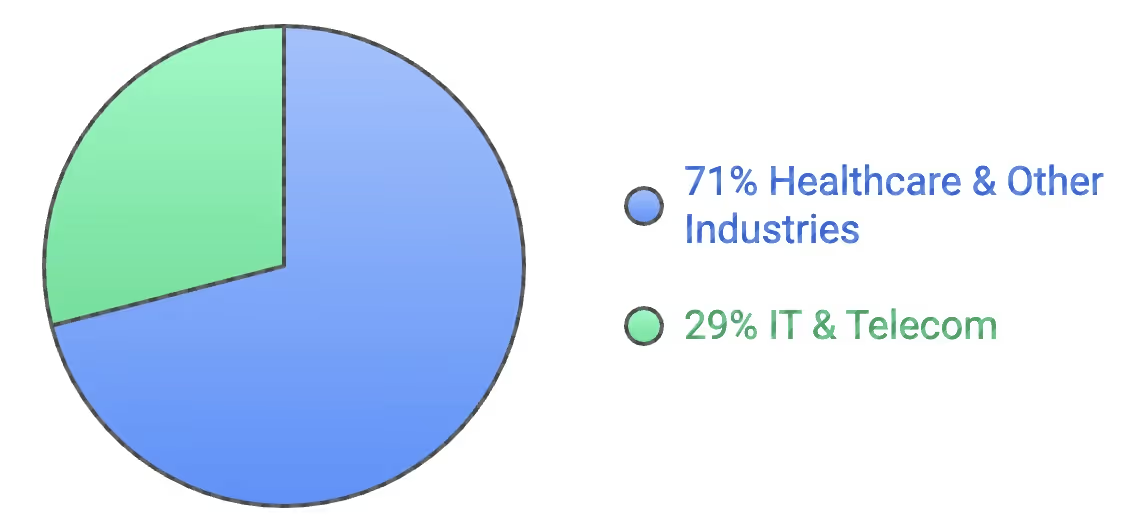
In 2025, Technology and telecommunications companies led adoption for AI recruiting software, reflecting their comfort with early experimentation and automation at scale. At the same time, healthcare systems emerged as the fastest-growing adopters, driven less by an appetite for innovation and more by necessity.
Chronic staffing shortages in roles such as nursing and radiology have made manual hiring unsustainable, prompting systems to rely on AI to verify credentials, match clinicians to shifts, and reduce vacancy windows that directly affect patient care.
The pie chart below represents the AI recruitment market share by industry:
Government agencies are increasing their adoption of AI under strict mandates on equal employment, transparency, and security. These environments demand more than surface-level automation; they require configurable compliance, auditability, and defensible workflows.
The market reflects this shift. While still fragmented, AI recruiting software is consolidating as buyers favor platforms that cover more of the hiring lifecycle, alongside specialized tools built for high-volume or frontline hiring. As a result, very different products are now grouped under the same label.
Not all AI recruiting software solves the same problem, and choosing the wrong type often leads to disappointment even when the technology itself is sound. This guide breaks down the types of AI recruiting software by function, helping teams understand what each category is actually designed to do, where it adds value, and where its limits are, so buying decisions are grounded in workflow reality, not market noise.
Type 1: Job Posting & Distribution Software
This software uses AI to create, optimize, and distribute job listings across multiple channels, job boards, marketplaces, and career sites from a single interface.
Common capabilities include:
- AI-assisted job description writing
- Keyword optimization for search and job boards
- Automated posting across multiple platforms
- Performance-based recommendations on where to post
These tools are effective at improving top-of-funnel visibility. Teams with limited reach or inconsistent job performance often see gains in applicant volume and posting efficiency, especially when managing many roles across locations.
The job posting and distribution software use case stops once a candidate applies. It does not reduce recruiter follow-up, validate documents or credentials, or speed up time-to-start.
As a result, it rarely improves hiring velocity on its own. More applicants don’t help if downstream workflows are slow or manual. These tools help you attract candidates, not move them into work. They’re a useful starting point, but they don’t solve the operational problems that typically delay hiring.
Recommended tools: Appcast, Broadbean, PandoLogic, Textio
Type 2: AI Screening & Matching Software
AI screening and matching software evaluates candidates against job requirements to help recruiters prioritize who to review first. These tools sit early in the funnel, between application submission and human review.
Common capabilities include:
- Resume parsing and normalization
- Candidate ranking and shortlisting
- Job–candidate matching based on skills, experience, or keywords
- Basic knock-out questions and eligibility checks
Screening tools are effective at reducing recruiter review time when applicant volume is high. They help teams quickly narrow large pools of candidates and focus attention on profiles that appear to be a closer match on paper.
Most screening tools stop at a recommendation. They typically do not validate whether candidate information is accurate or execute follow-up actions or workflows. Accuracy is also highly dependent on input quality. When resumes are outdated, incomplete, or inconsistent, matching scores become unreliable.
This software helps teams decide who to look at first and move candidates into productive work faster. It improves prioritization, but on its own, it rarely fixes the operational bottlenecks that slow hiring.
Recommended tools: Firstwork, HireVue, Eightfold AI, SeekOut
Type 3: Onboarding (Mobile-First) Software
Mobile-first onboarding software is designed to move candidates from offers accepted to “ready to work,” with flows optimized for phones rather than desktops. These tools focus on collecting information quickly and reducing early drop-offs.
Common capabilities include:
- Mobile-friendly onboarding flows
- Digital form completion and e-signatures
- Document uploads (IDs, contracts, tax forms)
- Task checklists and status tracking
Mobile-first onboarding tools are effective at improving candidate completion rates, especially for hourly, frontline, or deskless workers. By reducing friction and allowing candidates to complete steps on their own time, teams often see fewer abandoned onboarding flows.
This software helps candidates submit information faster, but it doesn’t guarantee they’re ready to work. Without real-time validation and automated checks, onboarding speed improves, but hiring velocity often doesn’t.
Recommended tools: Firstwork, Enboarder, BambooHR, WorkBright
Type 4: Compliance & Work Authorization Software
Compliance and work authorization software ensure candidates are legally eligible to work and meet role-specific regulatory requirements before they start. This category sits late in the hiring funnel but has an outsized impact on time-to-start and risk.
Common capabilities include:
- Identity verification
- Work authorization checks
- Background screening coordination
- License, certification, and credential validation
- Ongoing tracking of expirations and renewals
These tools are essential in regulated industries and high-risk roles where mistakes carry legal or financial consequences. When implemented well, they reduce exposure to fines, audits, and workforce shutdowns by enforcing compliance before a worker is activated.
Many compliance tools are fragmented across vendors and portals. Common issues include delayed checks, repeated document resubmissions, and heavy ops involvement to chase corrections. Even when onboarding is “complete,” workers may still be blocked from starting due to unresolved compliance gaps.
Compliance and work authorization software protects the business, but traditional implementations often slow hiring rather than enable it. Without real-time validation and automation, compliance becomes a bottleneck rather than a safeguard.
Recommended tools: Firstwork, HireRight, Checkr, Sterling, Certn
Type 5: Worker Communication & Engagement Software
Worker communication and engagement software focuses on keeping candidates and workers informed, responsive, and engaged throughout the hiring and onboarding process. These tools aim to reduce drop-offs by improving how information is delivered and how questions are handled.
Common capabilities include:
- Automated SMS, email, and in-app messaging
- Status updates and reminders
- Two-way messaging with candidates or workers
- Chatbots for FAQs and basic guidance
Employee communication and engagement tools are effective at improving responsiveness. They help candidates understand next steps, reduce uncertainty, and stay engaged, especially in high-volume or hourly hiring where delays quickly lead to drop-offs.
Communication alone doesn’t fix broken workflows. These tools typically do not execute tasks or resolve issues automatically, but they can validate documents or credentials, prevent errors that cause delays, and eliminate the need for manual ops intervention.
When the underlying process is slow or fragmented, better messaging simply makes delays more visible.
Recommended tools: Firstwork, Paradox, Sense, Beamery, Phenom
Common Buying Mistake: Solving the Wrong Problem
One of the most common reasons AI recruiting software fails is simple: teams buy tools to fix the wrong bottleneck.
Most buying decisions are driven by what’s most visible. If recruiters complain about too many resumes, teams buy screening software. If candidates stop responding, teams add communication tools. If onboarding feels slow, they layer in another form or checklist.
But in practice, hiring rarely breaks where teams think it does.
Organizations often spend heavily on improving job distribution to increase applicants, more sophisticated screening to rank candidates, and messaging tools to nudge candidates through the process. These tools improve activity at the top of the funnel, but they don’t address what actually delays hiring.
In most high-volume and regulated environments, time is lost:
- After offers are accepted
- During document collection and validation
- While resolving compliance and work authorization issues
- When errors surface late and require manual rework
No amount of better sourcing or screening fixes a broken post-offer workflow.
Buying the wrong type of software creates a false sense of progress. Applicant volume increases, dashboards look better, and communication improves, but start dates don’t move. Operations teams stay overloaded, and compliance risk remains. Over time, teams accumulate tools without removing work.
How to Avoid These Mistakes
Before evaluating vendors, ask one question: Where does time actually get lost between “offer accepted” and “first day of work”?
The answer should determine the category of software you evaluate. If you choose the wrong category, even the best product will disappoint. The fastest way to fail with AI recruiting software isn’t choosing the wrong vendor; it’s choosing the right vendor for the wrong problem.
Final Takeaway
AI recruiting software fails most often not because the technology is weak, but because it’s misapplied. Teams buy tools based on feature lists, AI claims, or peer recommendations without aligning them with the actual problem, slowing hiring.
Before evaluating vendors or comparing products, teams need clarity on one thing: where time, effort, and risk accumulate in their hiring process. Once that’s clear, the right category and the right tool become much easier to identify.
If your hiring slows down after offers are accepted during onboarding, compliance, or verification, that isn’t a market problem. They’re workflow problems.
Book a demo with Firstwork to see how teams automate verification, compliance, and post-offer workflows to move candidates into productive roles faster without increasing risk.